Start with one ledger and the right access
Install CoolMeow from the App Store or Google Play and sign in on each phone. Check the current store listing for device compatibility. Create one ledger for the costs you want to share, such as a weekend away or household spending.
Personal bookkeeping is free. Shared ledgers, device syncing, and receipt recognition are Basic features. Check Membership and the ledger owner’s access before setting up collaboration. Store purchase screens show current prices and subscription terms.
Invite the other person
On the ledger owner’s phone, open the ledger menu and choose Share & Invite. Enable sharing if needed, choose the member’s role, and send the invitation through your usual messaging app.
On the other phone, open the invitation and follow the join flow in CoolMeow. Open the joined ledger rather than creating a second book with the same name. Check the members list so you know who has access and what they can edit.
Record a shared expense
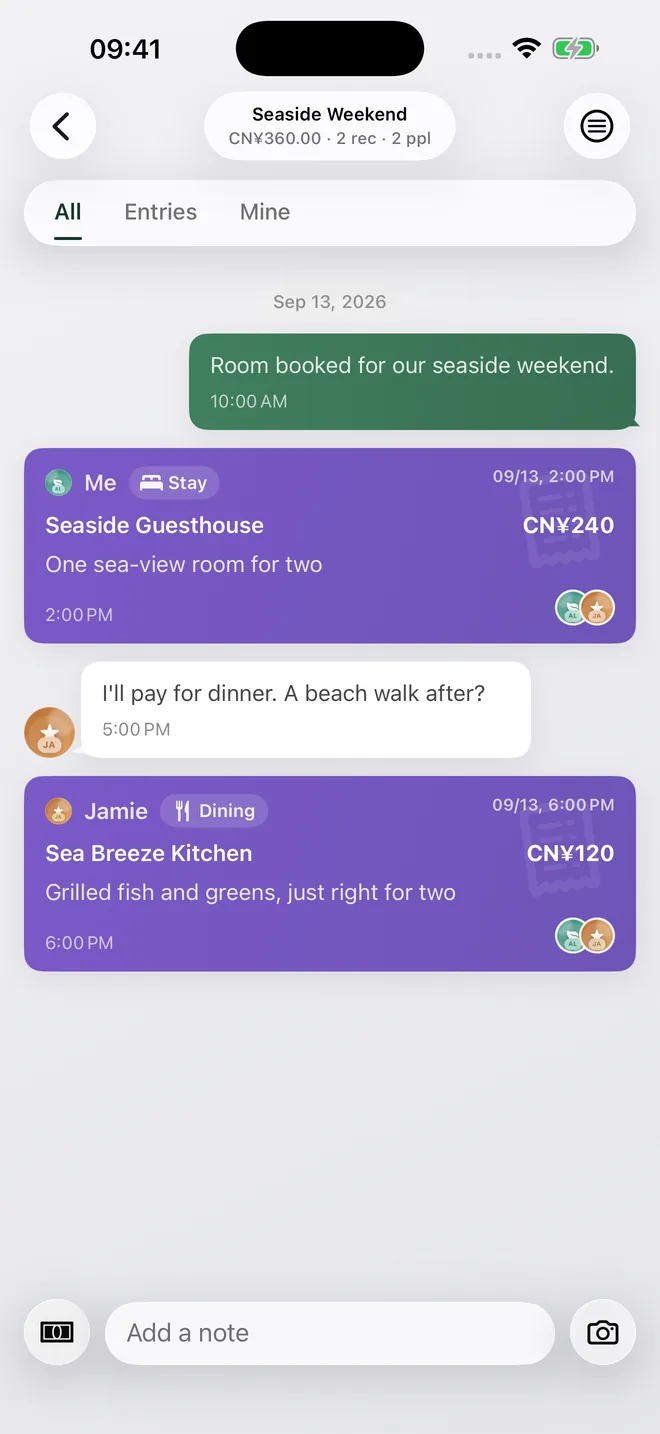
Open Quick Record on iOS or Quick Add on Android. Enter the amount, currency, title, and date. Choose the person who actually paid, then select everyone who took part in that expense. Save after checking those fields.
A dinner for two and a purchase for one person should have different participant selections. Keep a receipt, photo, or note with an entry when it explains the cost. These details are useful when you review the ledger later.
Check the result on the other phone
Keep both phones online, open the same shared ledger, and let syncing finish. Confirm the new title, amount, payer, and participants on the receiving phone. An entry still being submitted for approval is different from a saved expense.
If a record is missing, check that you joined the correct ledger, the signed-in account has access, and any required approval has completed. Avoid adding the expense again before checking the original.
Review spending together
Open Overview to review entries and spending by category, member, and date. Open the entries behind a total when you need to check what it includes. For a trip or meal, use Settle to inspect the calculated balances.
CoolMeow records and calculates shared expenses. It does not transfer money or connect to your bank account. Agree on the entries and split before arranging a payment separately.
Watch the shared-ledger example
A 46-second recording of the actual iOS and Android apps, using sample data. Waiting time is edited out. The suggested split is a calculation.