
On this page
Give the trip its own book
Create a ledger for the trip rather than mixing every travel purchase into an everyday book. Choose a name that you will recognize later, such as Seaside Weekend. Pick the main currency for its totals.
If you are traveling together, invite the other person into that same book. Each of you can record purchases and contribute notes from your own account. That works across iPhone and Android, with an active Basic membership on the owner's account.
You can still keep private purchases in a personal book. A shared trip record should contain the information you intend the other members to see.
An expense, a photo and a note in the same timeline
The sample below contains a CNY 120 dining entry titled Sea Breeze Kitchen. Its note says Grilled fish and greens, just right for two. A seaside photo and the note Sunset by the sea with Jamie follow it in the timeline.
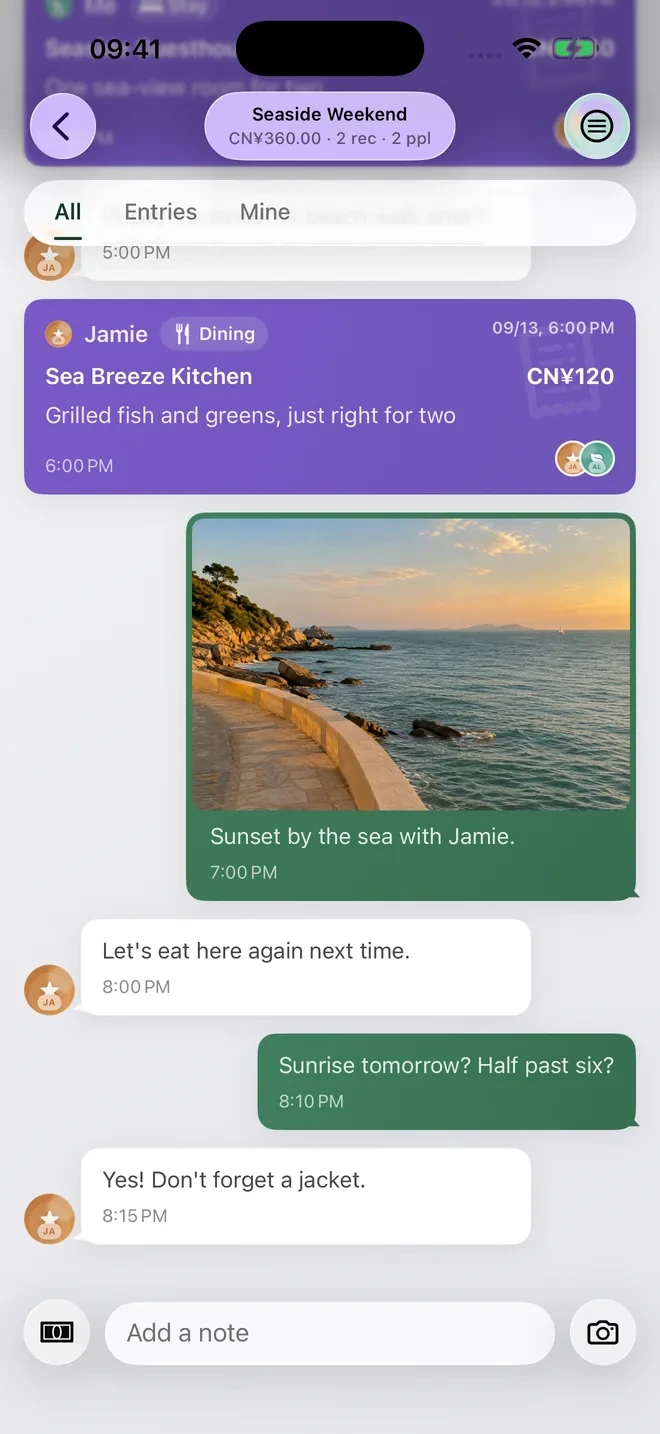
The restaurant entry contributes to the expense total. The photo and ordinary conversation notes provide context; they are not additional purchases. That distinction keeps a useful trip journal from becoming an inflated spending total.
The screen's CNY 360 header includes two expense records. Only the CNY 120 restaurant entry is visible in this crop, so the image alone does not explain the entire CNY 360 total.
Write enough to recognize the purchase later
Use Quick Record on iOS or Quick Add on Android for the amount, currency, category, payer and participants. A merchant name is usually more useful than a title such as Food.
Add a short note when the amount needs explanation. Dinner for Alex and Jamie can explain the selected participants. Included service charge can explain why the total differs from a menu price. Keep the receipt if you need proof of what was paid.
A currency should match the original purchase. For trips using several currencies, retain the original amount and review the conversion in the ledger's main currency.
Add a photo or a separate note
Use the ledger's image control to add a photo, or the note composer for a short message. A restaurant entrance, ticket or view can make the timeline easier to recognize than another line of numbers.
The example's Let's eat here again next time is a separate conversation note. It belongs in the timeline without pretending to be an expense. A practical note about a meeting time can sit there too.
For a shared book, look at the image before sending it. Receipts and tickets can include phone numbers, addresses or booking references. Share the context you need, using details appropriate for the other members.
Find it later by the merchant or a remembered phrase
Open the trip book and use search for a merchant name or text you put in a note. A specific name such as Sea Breeze Kitchen is easier to find than a collection of entries all titled Dinner.
A note can also carry a detail you remember later, such as near the pier. Search depends on the text saved in the book; this guide does not claim that the app understands a landscape photo or can find an uncaptioned sunset by its visual contents.
For a spending question, open Overview and inspect the category records. For a reimbursement question, review the payer and participants, then the balance in Settle. Photos and notes help explain those records, while the entered expenses drive the calculation.